Bank syncing is an Undebt.it+ feature. It runs through SimpleFIN, a small read only service that sits between your bank and Undebt.it, so Undebt.it never sees your bank login and can never move money. This article walks through the setup and the things that trip people up in the first day.
What SimpleFIN is
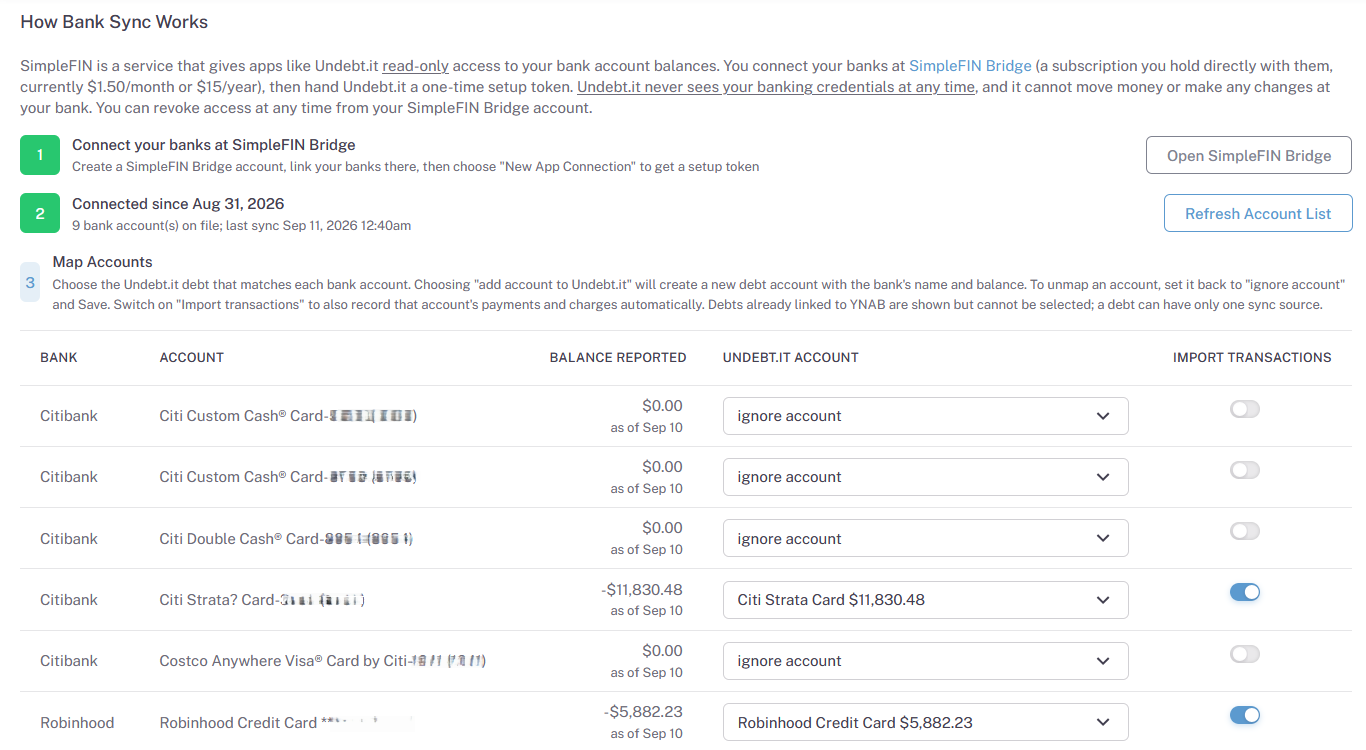
SimpleFIN Bridge connects to your bank on your behalf and hands out read only access tokens. It costs $1.50 a month or $15 a year, paid to SimpleFIN, not to Undebt.it. You link your banks once at SimpleFIN, then give Undebt.it a token. Undebt.it can read balances and transactions through that token and nothing else. You can revoke it at SimpleFIN at any time.
Setting it up
- Create a SimpleFIN Bridge account and link the banks that hold your debts (credit cards, loans).
- In SimpleFIN, create a new setup token for Undebt.it and copy it.
- In Undebt.it, open Tools and choose SimpleFIN Sync, paste the token and connect.
- Map each bank account to the matching debt on your account list. Leave any account unmapped if you do not track it here.
- Turn on Import transactions for any debt where you want payments and charges pulled in automatically. Leave it off to sync the balance only.
What happens on day one
If you linked a bank at SimpleFIN only minutes before connecting, the SimpleFIN Sync page may show zero accounts. That is not a fault. SimpleFIN needs anywhere from a few minutes to a day to finish pulling a newly linked bank. Come back later, or use Sync Now on the SimpleFIN Sync page (it can run once every 20 minutes). Once the accounts appear, map them and you are done.
The first transaction import looks back about 84 days. After that, each nightly run picks up anything new.
What syncs, and when
- Balances refresh every night at about 3:40am Eastern. The page shows each account's last sync time.
- With Import transactions on, payments and charges are added to the debt's history. If a bank posts the same payment twice under a new reference, Undebt.it matches it rather than duplicating it.
- When an imported payment covers the minimum, the debt's due date advances a month, the same rule as a payment you enter by hand.
- Need a balance right now? Sync Now on the SimpleFIN page, or the SimpleFIN Sync button on the debt's details page.
SimpleFIN and YNAB
A debt can sync from SimpleFIN or from YNAB, never both. If a debt is already linked to YNAB, the SimpleFIN mapping page will refuse it until you unlink it from YNAB. If you move a debt from YNAB to SimpleFIN, the payments YNAB already imported are kept and matched, not duplicated.
Unlinking or disconnecting
To stop syncing one debt, open its details page and use Unlink from SimpleFIN; the payments already imported stay. To disconnect entirely, remove the connection on the SimpleFIN Sync page, and revoke the token at SimpleFIN if you want to be certain nothing can read it again.
Limits worth knowing
SimpleFIN allows about 24 requests a day per token, so Sync Now is throttled rather than unlimited. Some banks are not on SimpleFIN yet; their coverage list is the place to check before subscribing. And if your bank asks you to re-authenticate, the nightly run will report it on the SimpleFIN Sync page until you reconnect at SimpleFIN.