DO YOU LIKE PROMO CODES? I KNOW I DO
SAVE 20% ON UNDEBT.IT+. USE PROMO CODE
TAKE20OFF
| CLICK
HERE
FOR MORE INFO
Home
More Info
Dealing With Debt
How the Debt Snowball Works
Feeling Overwhelmed with Debt?
Debt Management Tools
Quick Debt Snowball Calculator
Quick Debt Avalanche Calculator
Compare Debt Snowball vs. Debt Avalanche
Velocity Banking Calculator
Debt-To-Income (DTI) Calculator
Website Information
How Undebt.it Works
Pricing, Features & Reviews
FAQ, Help & Video Center
Affiliate Program & Private Labelling
Privacy Policy
Terms of Service
Support Undebt.it
About the Site
Premium Membership
Undebt.it+ Membership
52 Week Savings Challenge
Syncing With YNAB
The Debt Blaster
Undebt.AI
The Blog
Popular Posts
10 Simple Monthly Budget Templates in Google Sheets
25 Best Google Sheets Expense Tracker Templates
Cash Flow Index (CFI) Debt Payoff Method
How Budgeting and Debt Management Are Related
Everything You Need To Know About Sinking Funds
Recent Posts
Undebt.it Redesign Launch 2026
Updated Version of the Free Debt Snowball Calculator
My Credit Card Rewards Lineup for 2026
New Debt Planner Page Available
How to Use AI to Generate a Debt Snowball/Avalanche Payoff Plan
Blog Categories
Features
Undebt.it+
Debt Snowball
Debt Avalanche
Budgeting
Credit Cards
Savings
Contact
Toggle theme
Light
Dark
System
Log In
Create a Free Account
Home
FAQ & Knowledge Base
Basic Site Functions
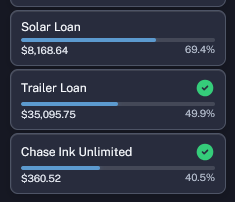
What does the green check mark mean?
Created November 16, 2022
39,592 Views
Basic Site Functions
Last Edited November 16, 2022
The green check mark in the
My Debt Accounts
side menu means that the debt account has met the monthly payoff goal and is done until next month.
Keywords
checkmark, check mark, green